
A collation specifies the bit patterns that represent each character, in SQL Server it provide sorting rules, case and accent sensitivity properties. Collation in table columns are used with data type ‘CHAR’, ‘VARCHAR’, ‘NVARCHAR’, ‘nchar’,’text’, ‘ntext’ dictate the code page and corresponding characters that can be represented for the data type. Even in one same table, different columns in the same data type can be represent in different collations, and it may result some errors when developer working on join sort or filtering data if there are different collations in the source.
For Example, I was working on extract data from a Netherlands company’s database into the global DB. and when I trying to load the sales data rows from Netherlands DB which not exist in our global DB, I joined the two tables in different server. an error raised up.


which was a result of comparing two data set which in same data type(here there both in nvarchar) yet in different collation.
and CAST are collation sensitive for CHAR, TEXT, NVARCHAR, so in my statement
SD.DocumentNo = cast(SOL.ORDERNUMMER as nvarchar)+”+cast(SOL.FACTUURNUMMER as nvarchar)
The output string maintain the same collation with input. In my case Ordernummer (order number) and FACTUURNNUMMER (Invoice number) were both collated in Latin1_General_BIN. and the combined string will be kept the same as Latin1_General_BIN. Meanwhile the right side of the equal, which is our global DB, DocumentNo is collated in SQL_Latin1_General_CP1_CI_AS.They are in different collations, left and right side, and it can’t be compared with each other. To resolve this conflict, just collate either side to make both in the same collation. for example:
You can
SD.DocumentNo Collate Latin1_General_BIN = cast(SOL.ORDERNUMMER as nvarchar)+”+cast(SOL.FACTUURNUMMER as nvarchar)
or you can
SD.DocumentNo = cast(SOL.ORDERNUMMER as nvarchar)+”+cast(SOL.FACTUURNUMMER as nvarchar) Collate SQL_Latin1_General_CP1_CI_AS
HOW TO CHECK MY DATA COLLATION?
In SSMS, expand database, find the table, expand it, find the column, right click, select properties-highlight is the collation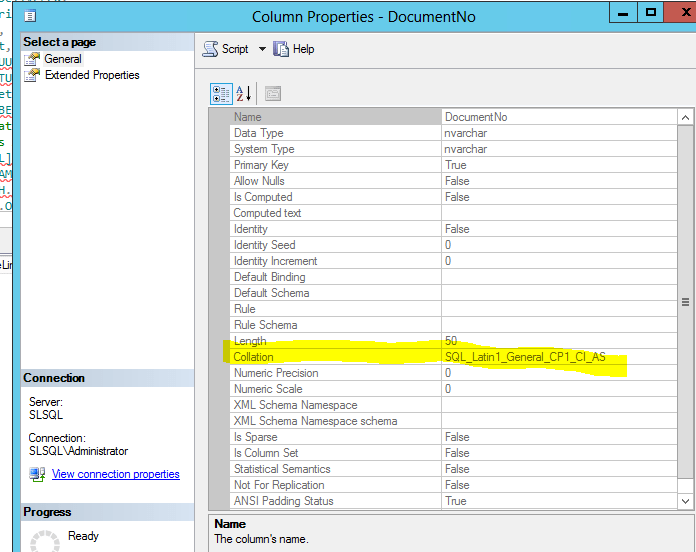
Or another simplest way is PASTE below query in your query window, it has all information about that column, COLLATION_NAME is in the very right almost to the end
select * from INFORMATION_SCHEMA.COLUMNS where TABLE_NAME=‘#YOUR TABLE NAME#’ AND COLUMN_NAME=‘#YOUR COLUMN NAME#’
And here please let me add some more information about collation sensitive. I copied from MSDN:
Operators and Collations are either sensitive or insensitive to collations. A collation sensitive means you have to specify a collection operand, if not a expression will result an error. Collation insensitive means you don’t have to collate, and result can be No collation.
the operators which are collation sensitives are: like, in, between, max, min. The UNION operator is also collation sensitive, and all string operands and the final result is assigned the collation of the operand with the highest precedence. The collation precedence of the UNION operands and result are evaluated column by column.
The assignment operator is collation insensitive and the right expression is cast to the left collation.
The string concatenation operator is collation sensitive, the two string operands and the result are assigned the collation label of the operand with the highest collation precedence. The UNION ALL and CASE operators are collation insensitive, and all string operands and the final results are assigned the collation label of the operand with the highest precedence. The collation precedence of the UNION ALL operands and result are evaluated column by column.
THE CAST, CONVERT, and COLLATE functions are collation sensitive for char, varchar, and text data types. If the input and output of the CAST and CONVERT functions are character strings, the output string has the collation label of the input string. If the input is not a character string, the output string is Coercible-default and assigned the collation of the current database for the connection, or the database that contains the user-defined function, stored procedure, or trigger in which the CAST or CONVERT is referenced.
For the built-in functions that return a string but do not take a string input, the result string is Coercible-default and is assigned either the collation of the current database, or the collation of the database that contains the user-defined function, stored procedure, or trigger in which the function is referenced.

 Vision Binary
Leave a comment