
A sales process is a series steps to be completed by a sales person to make a sale, it helps people to manage their sales pipeline. and very easy for a company to instruct what are the standard approach to make a sale. For all the opportunities, a sales person will choose the Sales Processes, and follow the instructions from the initial stage to the final, like make a phone call, write a letter, identify the business need, explore, align solution to business need, etc. Totally depends on how the management level required.
It’s very helpful to organize sale processes, every once a while the management level may come up with some ideas like adding new process, or adding more steps in one particular sales process, and this is something very easy to be handled.
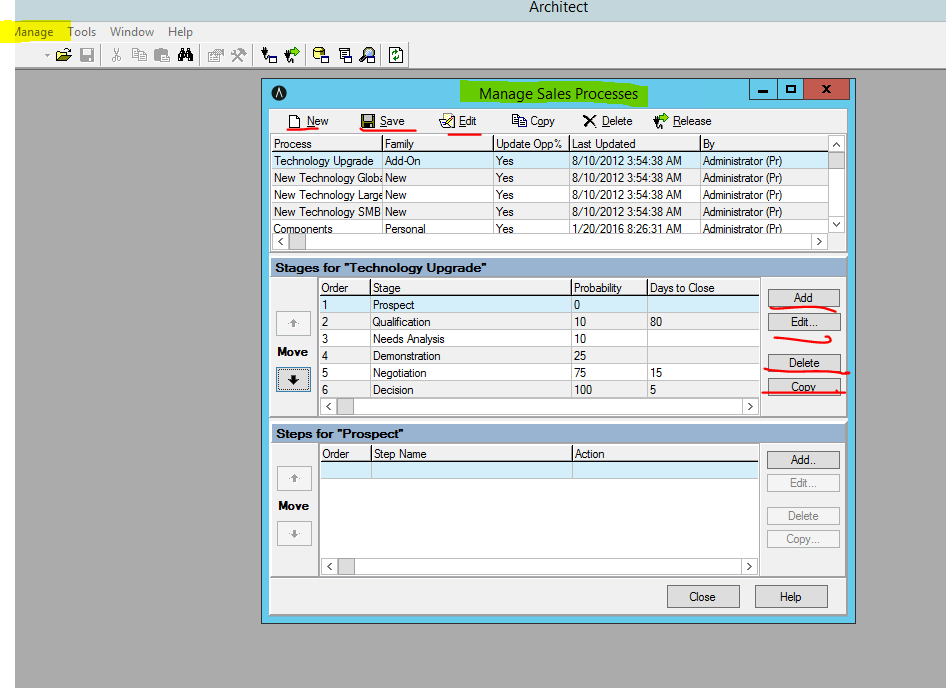
User login to your CRM utility server as admin, login to the Architect. in the Navigation bar, click Manage, choose Sales Process. a window name Manage Sales Process will come up. through this function in Architect, you can add, edit, delete.
If you need to add a Sale process which has most steps the sames as one existing sales process, you can simply click Copy, to copy over the existing one and you can name it differently, and edit the new one you just copy slightly to fulfill the requirement.

 Vision Binary
Leave a comment