
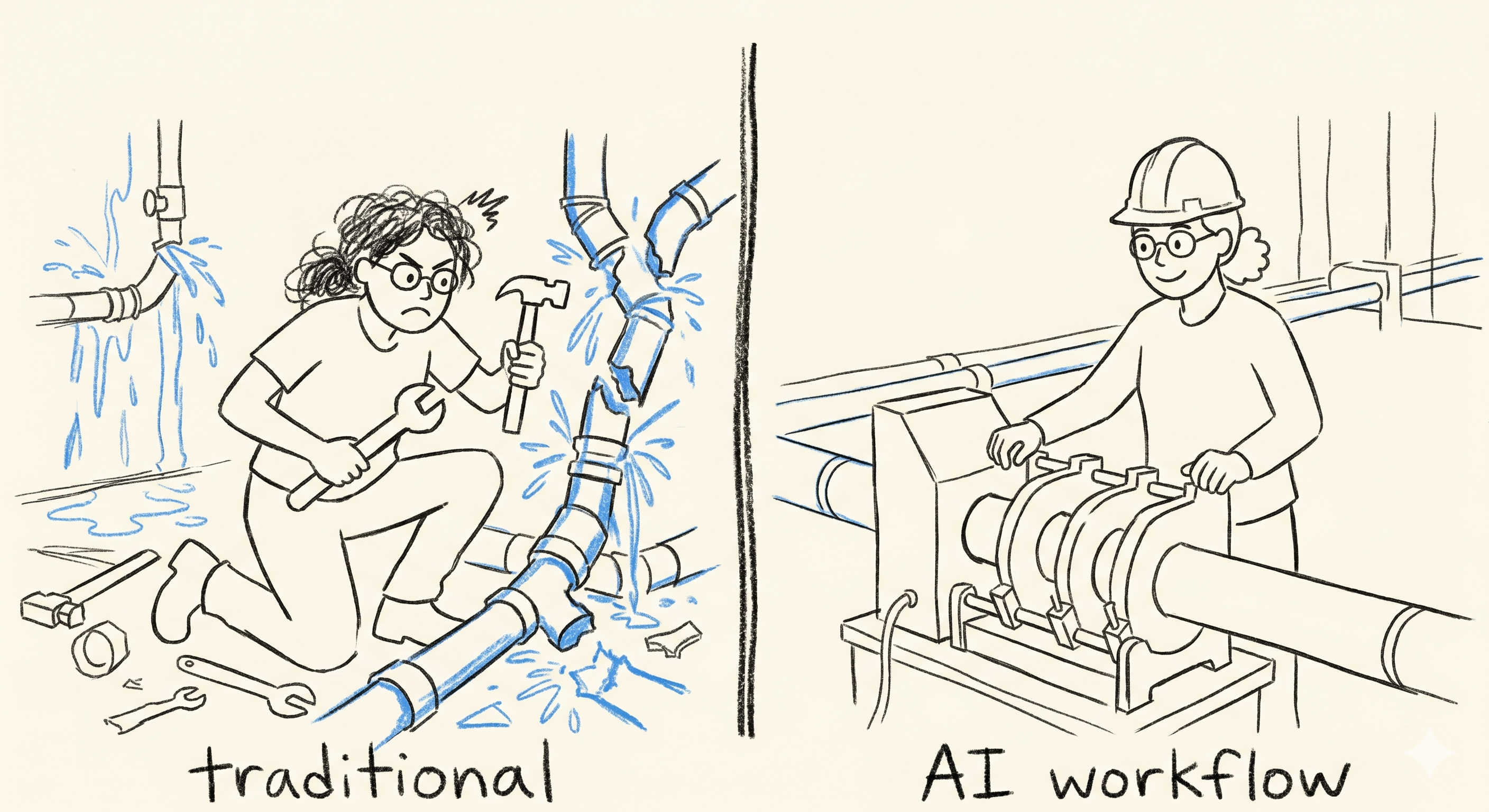
As data engineering teams rapidly integrate AI coding agents like Claude Code into their daily workflows, a new operational challenge has emerged: How do we standardize how the AI interacts with our stack? If every engineer prompts Claude differently to accomplish the same task, we lose consistency, risk data quality issues, and burn through cloud budgets due to variable code generation. To make workflows truly reusable, we have two primary mechanisms within the AI-Native toolkit: Standard Markdown Runbooks (CLAUDE.md ) and Project-Scoped Agent Skills (.claude/skills/).
Here to showcase how to identify automation candidates and how to choose between the two approaches, architect it, and build cost-effective, error-resistant AI tools using my experience.
Markdown vs. Claude Skills: The Trade-offs
Choosing the right vehicle for your team’s standard operating procedures (SOPs) depends on how frequently the task is performed and how much control you want to hand over to the AI.
| Markdown Runbook | Skills | |
| How it behaves | Passive,When launch Claude Code in your project directory, the agent automatically reads CLAUDE.md file right at the start of the session | Active, on-demand loading |
| Trigger Mechanism | Claude scans it and applies autonomously when relevant. | Triggered explicitly via a custom slash command |
| Cost | Every single prompt in the session is checked against relevance to the .md instructions. | Zero Background Cost. Consumes tokens at execution |
| Best for | Short context, since it is scanned for every message. Use it for high-level repository truth such as code style, engineering principles (DRY, KISS, SOLID), naming conventions, core architectures) | Highly procedural, multi-step actions or scripts. |
If the information is a fact that Claude must always keep in mind while modifying your code, use Markdown. If the workflow is a procedure that results in an action being taken, package it as a Skill.
Identify the tasks for AI Standardization
Data engineering work can be packed with repetitive tasks, and friction points. Find the best candidate to convert into a shared Claude Skill, look for workflows that meet the following patterns:
- Multi-step tooling: workflows that require switch between different tools and utilities.
- Strict naming/schema convention: Tasks where engineers can miss and lead to frequent errors, such as format mismatches, datatypes to destination tables.
- Environment isolation: Complex tasks that require a specific sequence setup and validation.
My Example – Local File to GCP BigQuery Tables.
To streamline uploading my files to the GCP buckets and turn them into BigQuery tables. There is a bunch of gcloud commands that need to run, each command will use a different file path, table names, dataset names, and bucket names, and slowly this work turns into a chore for me.
So instead, in my project directory, I created the file structure below:
GCP/├── .claude/│ └── skills/│ └── ingest-data/│ └── SKILL.md <-- Contains the token-optimized instructions│ └── scripts │ └── ingest_gcp.py <-- Contains script that upload my data and turn into BigQuery Tables
Below is the command I have to manually run just to upload files and create tables in my GCP BigQuery.
python ingest_gcp.py --file "[my_file_path]" --bucket "[my_gs_bucket]" --dataset "[my_bq_dataset]" --table "[my_bq_table]"
There were many other tasks I had to do before and after the script, just to make sure the tables were created or updated successfully. So even though the script was there, only 60% of the work was done by it; there were still 40% manual steps required. And thinking of this could be the daily norm that many engineers in your team need to do, is very painful and inefficient. And even if you can pack them all into one piece of code and share with your team, others still need to know exactly where the code is, full path names, and structured parameters as input, no typos, need to debug if an error occurs, which requires a certain level of engineering skills; it still can be a pain.
By turning this procedure into a project-scoped command at .claude/skills/ingest-data/SKILL.md, commit to team repo so every engineer can use it, it ensure minimized the typings, standardizes the process, mitigates the risk of human errors, easy to debug, enables all skill level developers to utilize the AI instance with a single slash command: /ingest-data, this can also benefit task assignment if you want a certain type of work owned by limited set of developers.
The screenshot below shows that after creating skills/ingest-data/SKILL.md, my “ingest-data” is invokable through “/ingest-data”.

Engineering work isn’t about executing code and calling it a day; the environment can be flawed, humans can have typos, the file may not match or transform as expected, and code may not handle all situations. While data professionals are working on a data product/service, there are procedures to perform on pre-checks, error handling, and result validation to ensure the work meets the defined successful criteria; all these tasks need to be incorporated into our SKILL as a multi-step procedure.
In my /ingest-data case, here are the steps in my SKILL.
Built-in Verification and Execution Safety
Pre-flight Checks: I instructed Claude to verify that local file paths exist using standard terminal operations before launching the ingest_gcp.py script.
Authentication Audits: Have the skill query active GCP configurations (gcloud config get-value project) to confirm Claude is pointed at the correct project before initiating an upload.
Graceful Error Handling
When a background Python script or cloud utility fails, standard error codes can confuse an AI agent, causing it to iterate in a broken loop.
- Explicitly command Claude to intercept traceback errors.
- Instruct the agent to halt execution immediately to report the clear human-readable issue back to the developer, yield control back to the developer rather than making random, costly attempts to rewrite the infrastructure code.
Here is my command use the SKILL: “/ingest-data local file [your file path]; upload to gcp bucket [bucket name]; big query dataset names is [db_schema], table name is [your_tbl_name]”
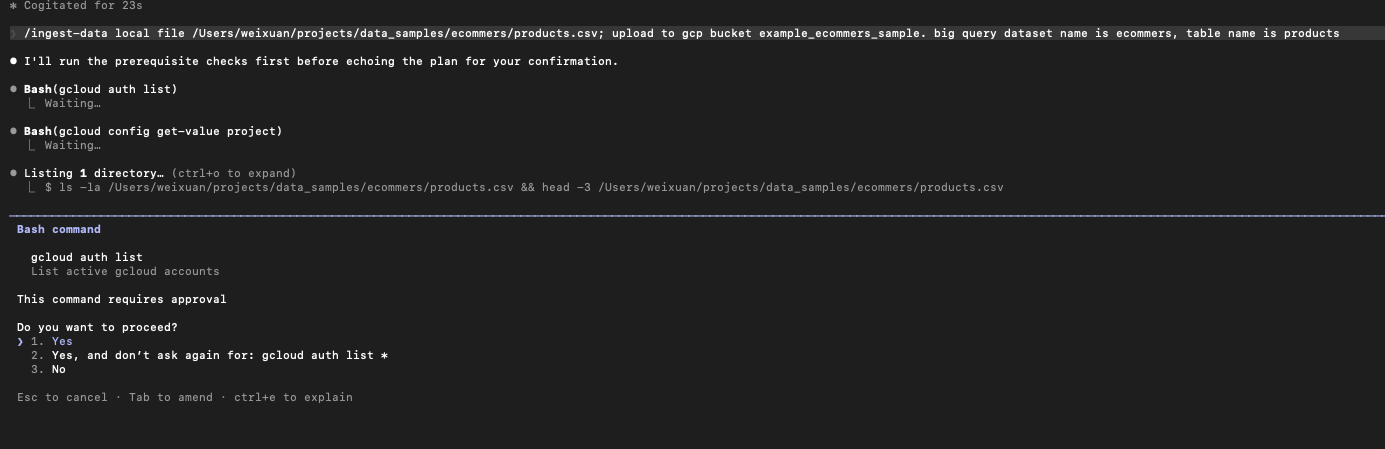
The command is running with the instructed steps and python code:
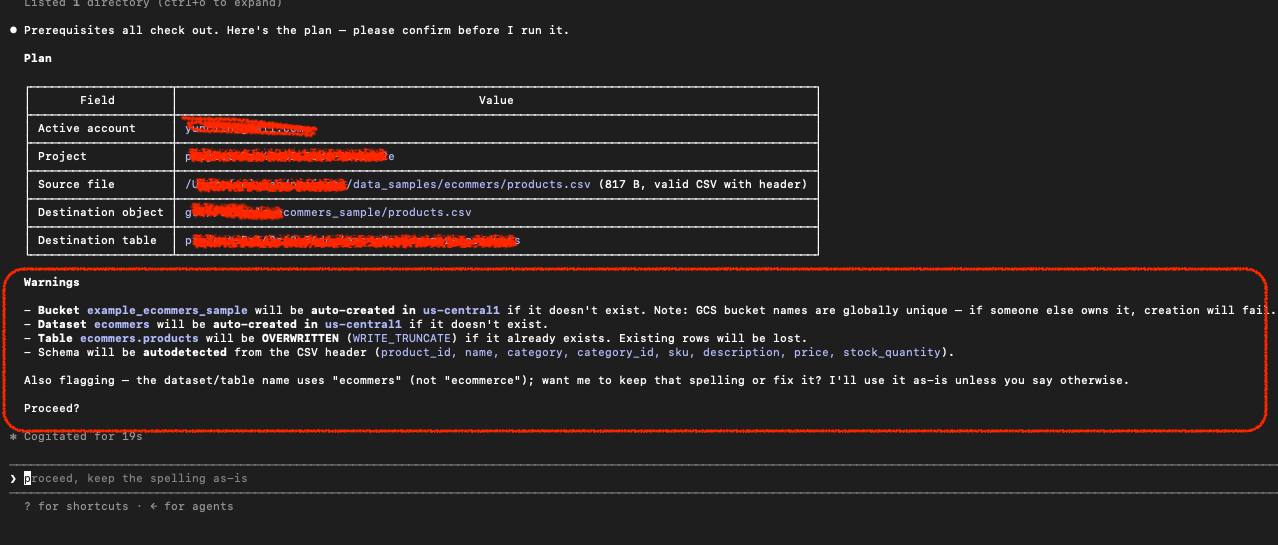
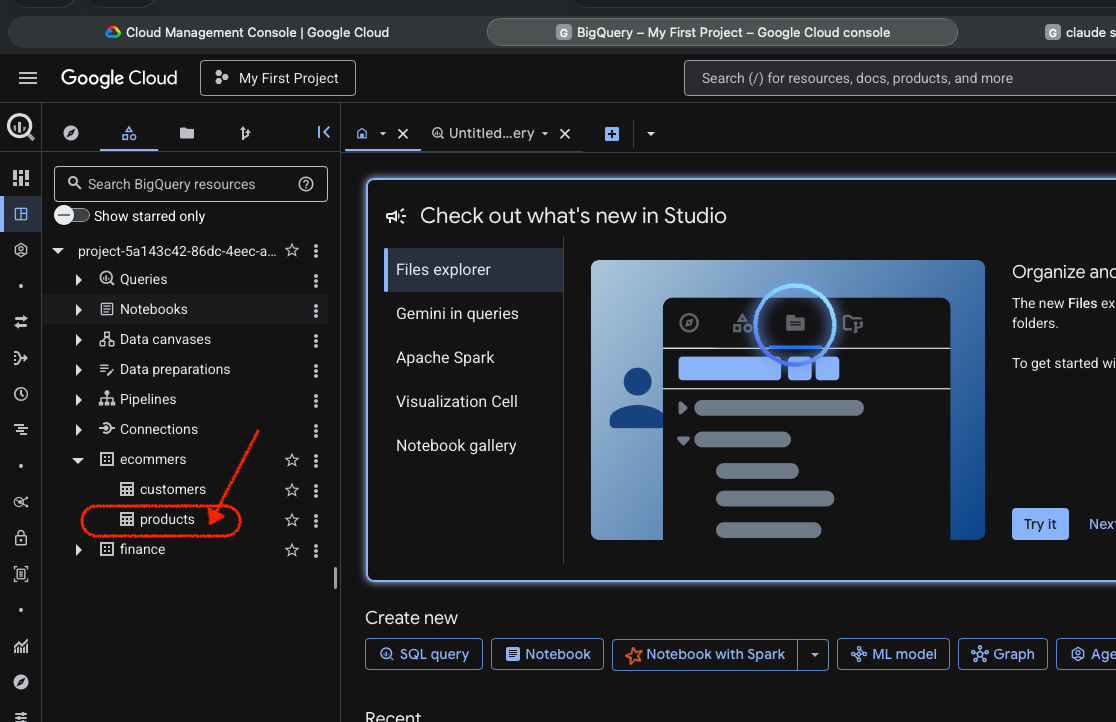
After all the validation steps, the product table is created:
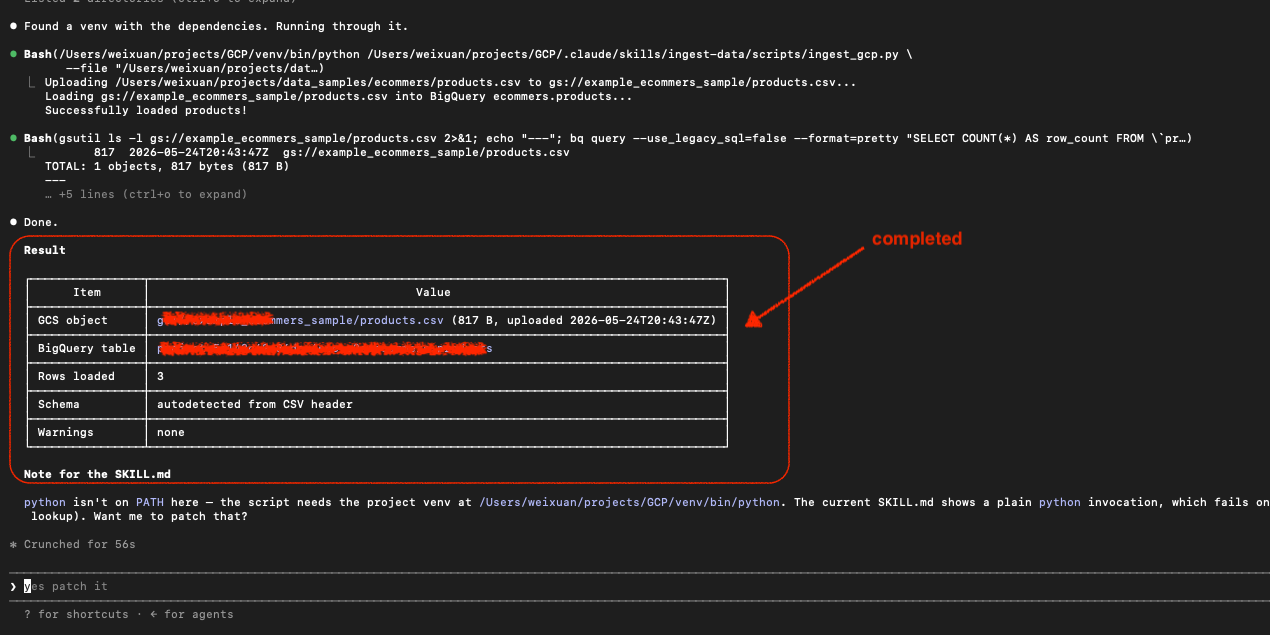
refresh my GCP BigQuery Studio, i can see the product table. in my SKILL.md I have a core step to verify from the command line using gcloud cmd before completing the task.
Summary:
When standardizing data pipelines for an AI-augmented engineering team, choosing how to anchor your workflows is a balancing act between ambient context and on-demand execution. While global Markdown runbooks (CLAUDE.md) serve as your repository’s cultural compass—ideal for persistent rules like code styling or architecture constraints—the true engineering toolkit lies within project-scoped Agent Skills (SKILL.md).
By packaging highly repetitive, multi-step procedures (like our GCS-to-BigQuery ingestion tool) into a dedicated command and setting the disable-model-invocation: trueflag, you keep background token overhead at absolute zero, activating the pipeline only when explicitly invoked via slash commands (my case /ingest-data). Code the core logic into predictable, standalone Python scripts, design the SKILL.md to cleanly handle error boundaries and environment checks, and commit the whole layout to Git so that your entire development team inherits an optimized, cost-effective automation multiplier the second they clone the repository.
Tips for creating an effective SKILL.md
I initialized Claude Code in my project directory. In the prompt, I asked it to read my ingest_gcp.py script, and explained the workflow steps with my pre-checks, execution plan, validation steps, and error handling and explicitly asked Claude to generate the SKILL.md, this is my draft to begin with. Then I use VS code continue to refine, add/remove instructions. I have constructed and tested edge cases multiple times, such as wrong input file names, typos, bad datatypes, unclear instructions, until Claude Code performs to my expectation. To really utilize Claude skill as an enabler in engineering work, i recommend:
- Identify current repetitive and manual workflows – discuss with your team.
- Identify pre-requisites, edge cases, error handling steps, validations, and success criteria – discuss with the team.
- Structure the workflow with clear steps from above actions – Review with the team
- Turn the steps into SKILL.md core instructions. – Review with the team
- Construct code for automation if it is required, place them in .claude/skill/[your_skill_name]/scripts folder – Collaborate with team
- Testing – Invite all team member to test and break it
- Deploy and version control, document it so everyone knows how to use it.
- Update the skill if it requires, repeat the above steps.
Architectural Cost-Efficiency
- Enforce On-Demand Invocation: Use the frontmatter flags
user_invocable: trueanddisable-model-invocation: true. This prevents Claude from autonomously or accidentally executing cloud data pipelines during normal chat sessions. - Keep Descriptions Functional: Write the skill’s body to state exactly what to do rather than narrating why it’s done.
- Leverage the Filesystem: Keep
SKILL.mdunder 500 lines. If you have complex target schemas or reference mapping tables, keep them in secondary files inside the skill’s directory (e.g.,data/schema-template.json). Claude will read those files dynamically using bash only when needed, preserving your active token window.
Thanks for reading, please share your thoughts and questions in comments.

 Vision Binary
Leave a comment