
Bulk Action update is very quick way to edit information in a specific record in CRM entity page. To make the work easier, especially you have to update one field in many records, using this bulk update indeed save a lot of time. But what if the field you need to update, not exists in this bulk action update? open each record and go to the field to modify the value can be exhausted. now here I will show you how to add the field you need to constantly modify into Bulk Action Update form.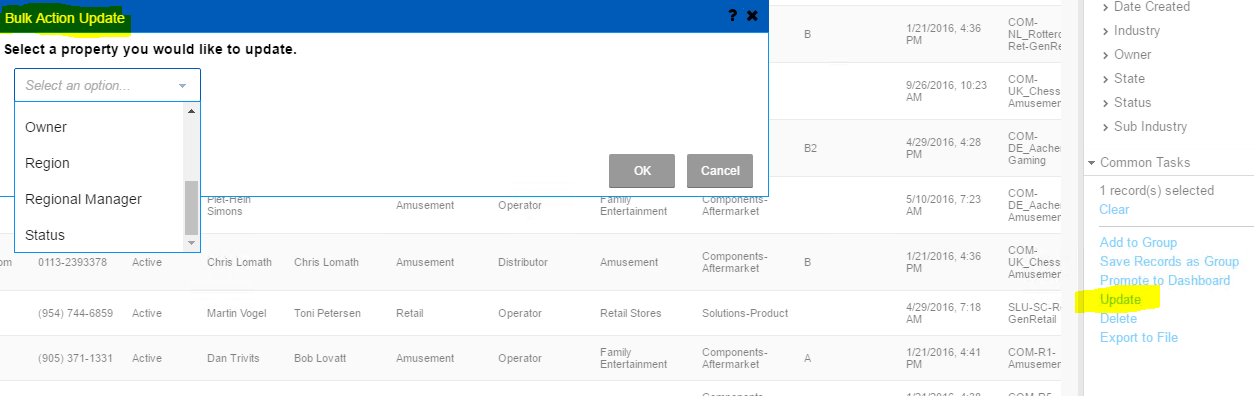
Go to Application Architect, open packages – SalesLogix Application Entities, find the entity, look for the property need to be added, double click the property, from property window, in “Advanced”, this is an option-Can Bulk Update, set it as True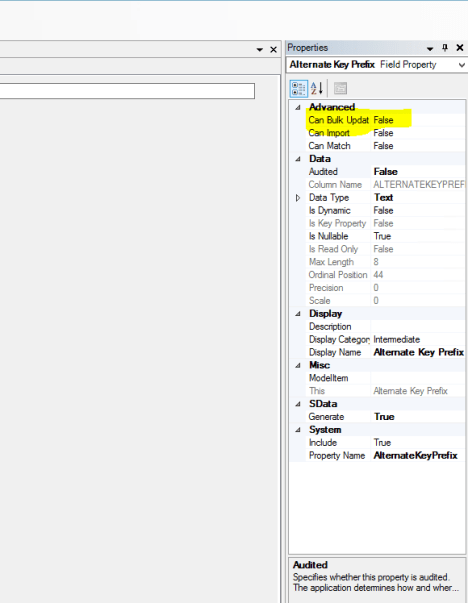
and rebuild the web platform. and deploy. You are all set, now you can just simply click update in context menu to update this filed you just added.

 Vision Binary
Leave a comment